My First Game Design Book: A Practical Tool for Introducing Kids to Game Programming
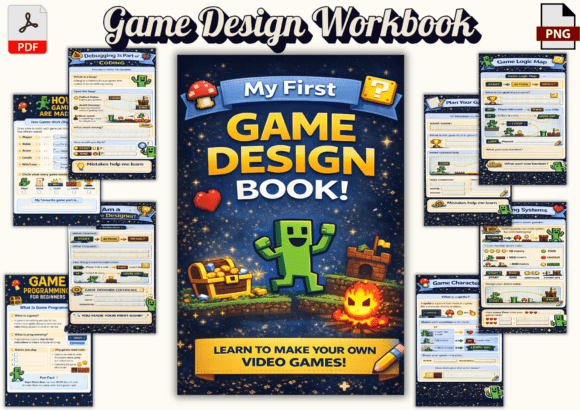
For educators, creators, and parents looking to introduce children aged 7–12 to the fundamentals of game design and programming, My First Game Design Book offers a structured yet engaging entry point. This 17-page printable workbook is designed to fit seamlessly into early learning workflows that emphasize computational thinking, logical reasoning, and creative problem-solving. Unlike traditional coding tutorials that may overwhelm young learners, this resource uses drawing, puzzles, and planning exercises to teach foundational programming concepts in a way that aligns with how children naturally learn and explore.
How It Fits Into a Learning or Development Workflow
Whether you're an educator planning a classroom activity, a parent supporting a child's interest in coding, or a creator developing educational content, My First Game Design Book serves as a preparatory and reinforcing tool. It can be used before a child begins working with a visual programming platform like Scratch or Blockly, helping them understand core concepts such as sequences, loops, and conditions before they start building actual games. Alternatively, it can function as a complementary resource during a coding project, offering structured exercises that reinforce what's being implemented in a digital environment.
For educators, integrating this workbook into a curriculum can help establish a consistent learning rhythm. It allows students to work through concepts at their own pace before transitioning to interactive tools, reducing frustration and increasing comprehension. For independent learners or hobbyists, it provides a low-pressure entry point into the broader world of game development and software logic.
What’s Inside and Why It Matters
The workbook covers a range of essential topics, each presented through interactive, age-appropriate activities. These include:
- Game Components: Understanding players, rules, scoring, and levels as fundamental elements of any game.
- Algorithms and Sequences: Learning how step-by-step instructions and order affect game behavior.
- Loops and Conditions: Introducing repetition and decision-making in game logic.
- Character and Level Design: Encouraging creativity through sprite design and mapping game worlds.
- Debugging and Reflection: Building resilience and analytical thinking by identifying and fixing mistakes.
Each section is designed to be completed independently or as part of a guided session, making it flexible for different learning environments. The inclusion of a logic flow map and game planning worksheets helps bridge the gap between conceptual understanding and practical implementation, which is especially valuable for those who plan to transition into actual game development tools later.
Integration with Other Tools and Platforms
My First Game Design Book works best when used in conjunction with other educational tools. For instance, after completing the workbook, children can apply what they’ve learned using platforms like Scratch, Tynker, or even Unity (with guidance). The workbook’s focus on foundational logic prepares them to better understand how visual or block-based coding tools function, making the transition smoother and more intuitive.
For educators or content creators, this resource can be embedded into a larger lesson plan or online course. Its printable format allows for easy distribution in both digital and physical learning environments. Additionally, the inclusion of PNG and PDF files ensures compatibility with learning management systems (LMS), digital whiteboards, or printable handouts, supporting a variety of teaching workflows.
Practical Implementation Tips
Here are some practical ways to integrate My First Game Design Book into your learning or development process:
- Use it as a Preparatory Tool: Before introducing a child to a coding platform, have them complete sections of the workbook that correspond to the upcoming concepts. This primes their understanding and reduces cognitive load when they begin using the software.
- Pair It with Hands-On Projects: As they work through the workbook, encourage them to build a simple game using a tool like Scratch. This reinforces learning by connecting abstract concepts to real-world application.
- Incorporate It Into Group Activities: Use the workbook in a classroom or workshop setting where students can collaborate on game planning and logic puzzles, promoting teamwork and peer learning.
- Track Progress with Reflection: The included Game Designer Reflection Certificate and logic flow map can be used to assess comprehension and encourage metacognition—helping kids think about how they think.
Organization and Workflow Efficiency
One of the key strengths of My First Game Design Book is its structured layout. Each section builds logically on the previous one, allowing for a progressive learning experience. This makes it easy to integrate into a weekly lesson plan or a self-paced learning module. Educators can assign specific pages based on the current topic, while parents can guide their children through the workbook at a comfortable pace.
The 6 x 9-inch format and 17-page length make it digestible without being overwhelming. The inclusion of professional front and back covers also adds a sense of completion and professionalism, which can be motivating for young learners who enjoy seeing their progress in a tangible format.
Quality and Long-Term Use
Because the workbook is available as both a high-resolution PNG and a print-ready PDF, users can choose how they want to engage with the material. Printing the workbook allows for repeated use with pencils or erasable markers, while the digital format supports annotation on tablets or computers. This flexibility ensures that the resource remains useful across different learning environments and preferences.
From a quality control perspective, the workbook avoids common pitfalls of children’s educational materials—such as being too abstract or too technical. It strikes a balance between creativity and structure, making it suitable for a wide range of learning styles. Whether a child is naturally drawn to art, logic puzzles, or storytelling, there’s an entry point that resonates with them.
Who Should Use This Workbook and Why
My First Game Design Book is ideal for:
- Educators: Looking to introduce computational thinking in a developmentally appropriate way.
- Parents: Seeking to support their child’s interest in coding without requiring prior technical knowledge.
- Content Creators: Developing beginner-friendly programming courses or digital learning kits.
- Small Business Owners: Offering educational products or workshops for children.
- Hobbyists: Interested in guiding the next generation of creators through game development.
Its versatility makes it a valuable addition to any learning or creative workflow where foundational coding skills are a goal. It’s not just about teaching kids to code—it’s about teaching them to think, plan, and solve problems in a way that translates to multiple disciplines.
Final Thoughts on Integration and Workflow Fit
Incorporating My First Game Design Book into your existing process doesn’t require a complete overhaul of your teaching or development strategy. Instead, it enhances what you’re already doing by providing a structured, accessible introduction to game programming. Whether used as a standalone resource or as part of a broader learning path, it supports the development of essential skills in a way that aligns with modern educational standards and digital literacy goals.
For professionals and creators, this workbook represents a practical, high-impact tool that can be leveraged in various ways—whether you're building a course, planning a workshop, or simply supporting a child’s curiosity. Its focus on foundational logic, creative design, and problem-solving makes it more than just a workbook—it’s a stepping stone to deeper engagement with technology and innovation.