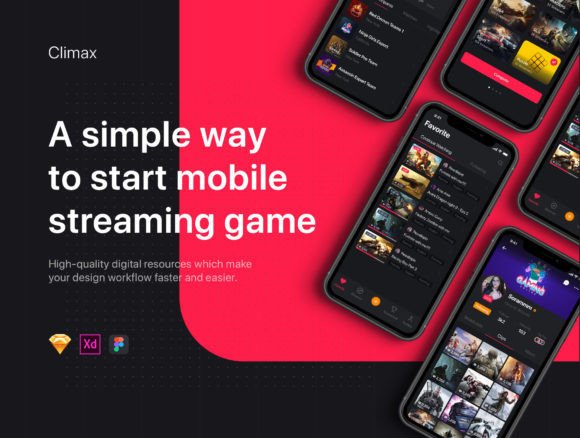
Climax Live Game Streaming UI Kit
Design Made Easier for Streaming Game Apps
If you're building a live game streaming app, having a strong visual interface is essential. The Climax - Live Game Streaming UI Kit offers a comprehensive set of tools to streamline your design process. Whether you're part of a startup, a design agency, or an independent UI/UX designer, this kit can help bring your ideas to life with minimal effort and maximum impact.
What You Get with Climax
This UI kit includes 31 beautifully crafted app screen templates, each designed with modern aesthetics and functionality in mind. These templates cover a wide range of interface needs—from home screens and live streaming views to chat interfaces and profile settings. What makes Climax stand out is its compatibility with both iOS and Android systems, ensuring your designs work seamlessly across platforms.
Each file is packed with recent design features such as Symbols, Overrides, and Resize Options, which allow for flexible and efficient editing. You'll also find pre-defined Text and Layer Styles, helping maintain consistency throughout your project without repetitive manual adjustments.
Why Climax Works for Real-World Projects
One of the biggest challenges in app development is maintaining a balance between speed and quality. Climax addresses this by providing a ready-to-use framework that doesn't sacrifice visual appeal or usability. For startups, this means faster prototyping and quicker time-to-market. Agencies can deliver polished, professional results to clients without reinventing the wheel for every project. And for individual designers, it's a chance to focus more on creativity and less on repetitive layout tasks.
For example, imagine you're working on a new live streaming app for mobile gamers. With Climax, you can quickly assemble a user-friendly interface that includes live chat, viewer interaction tools, and in-game commentary features—all from pre-built templates. This not only speeds up the design phase but also ensures a consistent user experience across all screens.
Applications Across Different Fields
The versatility of the Climax - Live Game Streaming UI Kit makes it suitable for a wide variety of applications beyond just gaming. Here are a few examples:
- Professional Use: Design agencies can use the kit to pitch interface concepts to clients, speeding up the approval process with high-fidelity mockups.
- Educational Tools: Instructors teaching UI/UX design can use the templates as learning resources to demonstrate best practices in real-world app interfaces.
- Content Creators: Streamers and digital creators can customize the interface to reflect their brand identity, enhancing viewer engagement with a more polished look.
- Entrepreneurs: Startup founders can use the kit to build functional prototypes for investor presentations or early user testing without hiring a full design team.
Benefits That Make a Difference
Using the Climax UI Kit offers more than just visual appeal. It brings a host of practical benefits that can improve your design workflow and end-user experience:
- Improved Usability: The templates follow modern UI conventions, making it easier for users to navigate and interact with your app.
- Consistent Branding: Pre-styled elements help maintain a cohesive look and feel across all screens, reinforcing your brand identity.
- Higher Engagement: A clean, intuitive interface encourages users to stay longer and interact more with your content.
- Time and Cost Efficiency: Ready-to-use components reduce the need for custom design work, cutting down both development time and budget.
How to Make the Most of Climax
While the Climax - Live Game Streaming UI Kit provides a solid foundation, how you use it can determine the success of your project. Here are a few tips to get the most out of the kit:
- Customize Thoughtfully: Don’t just drop templates into your project without tailoring them. Adjust colors, fonts, and layouts to align with your brand’s visual identity.
- Test with Real Users: Even with a polished UI, user testing is crucial. Use the templates as a starting point, then gather feedback to refine the experience.
- Stay Updated: As mobile platforms evolve, so should your designs. Check for updates to the kit that support the latest OS versions and screen sizes.
- Combine with Other Tools: If you're using design software like Figma or Sketch, take advantage of the Symbols and Overrides to streamline your workflow even further.
Considerations Before You Start
Before diving into the Climax UI Kit, it’s important to evaluate whether it fits your specific project needs. While it's a powerful tool, not every app will benefit equally from its features. For instance, if your project requires highly customized animations or complex interactive elements beyond standard UI components, you may need to supplement the kit with additional design work.
Also, consider your team's familiarity with design tools. Climax works best for those already comfortable with platforms like Figma or Sketch. If you're new to these tools, factor in some learning time before launching into your project.
Final Thoughts
The Climax - Live Game Streaming UI Kit is more than just a set of templates—it's a practical solution for designers who want to create high-quality, functional interfaces without starting from scratch. Whether you're building a new streaming app, revamping an existing one, or simply exploring UI/UX design, this kit offers a valuable foundation to build upon.
By combining efficiency with visual appeal, Climax empowers you to focus on what matters most: delivering a seamless and engaging user experience. With the right approach, it can be a game-changer for your next project.